Coffee Roulette Across Time Zones and Seniority Levels
Random pairing breaks on a distributed team for a simple reason: some pairs have no working hours in common. Match someone in India with someone on the US West Coast and a standard 9-to-5 day on each side never overlaps, not for one hour. In winter, either the person in India joins a call between 10:30 p.m. and 6:30 a.m., or the person on the West Coast joins outside their own workday, for a chat that was supposed to be a break.
The fix is to set a time zone preference, so people in India are more likely to be matched with people in Singapore, people on the US West Coast with people in Mexico City or Bogotá, and people in the UK with people in Western and Central Europe. You keep the random mix and make impossible meetings less likely. This guide shows the hour math, explains what you give up, and walks through the settings, including an optional seniority preference.
Time zone spread is not a niche problem. Microsoft's telemetry from Microsoft 365 reported that 30% of meetings now span multiple time zones, a figure that has risen 8 percentage points since 2021, and that meetings starting after 8 p.m. were up 16% year over year, driven by cross-time-zone collaboration (Microsoft Work Trend Index special report, June 2025). The data ends in February 2025 and excludes education and European Union tenants.
Key takeaways
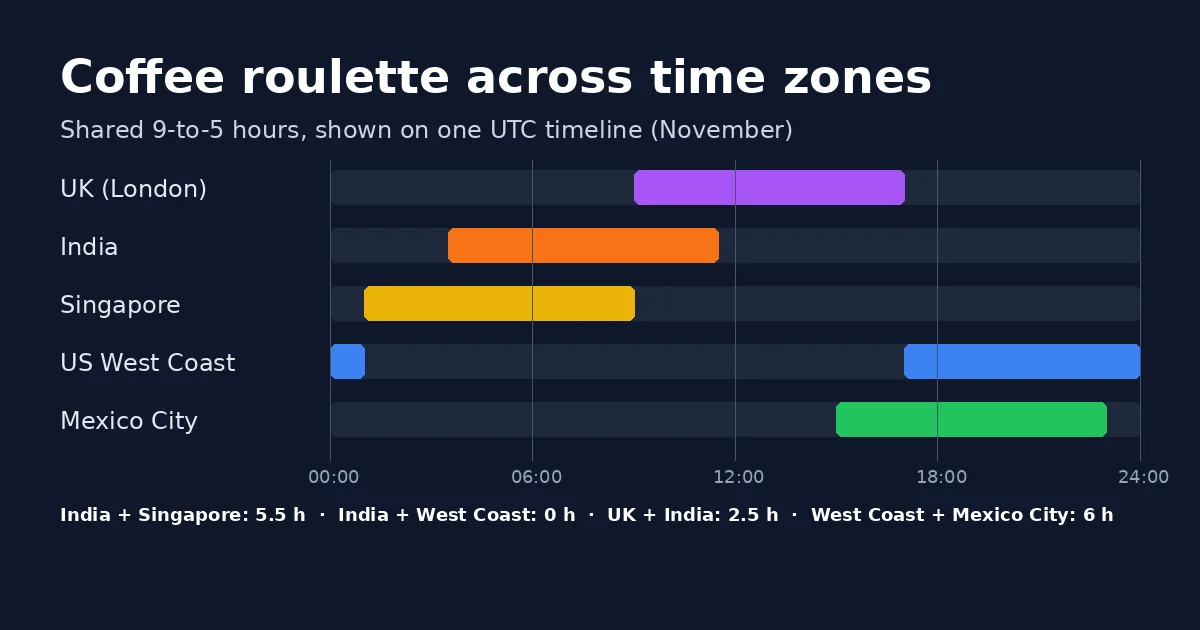
- A US West Coast and India pairing shares 0 hours of a 9-to-5 day. India and Singapore share 5.5.
- Favor nearby time zones: "Within 3 hours" fits India with Singapore and the West Coast with Mexico City or Bogotá. São Paulo is 4 to 5 hours from Pacific time, so it falls outside.
- From the UK, Berlin and Paris are 1 hour away and fit. New York is 5 hours away for most of the year and shares 3 hours of a 9-to-5 day, so it falls outside.
- Tighter preferences mean a smaller pool of preferred partners and fewer ties across regions. Pick the loosest setting that still steers pairs away from bad meeting times.
- Seniority preferences are optional. "Similar level" suits peer connection, "Different levels" suits cross-level mentoring.
- In TeamBlend, all three matching preferences are off by default and act as soft rankings, not promises.
Why does random pairing fail across time zones?
Random pairing fails when partners sit far apart on the clock: a gap of eight hours or more leaves no shared 9-to-5 hours. On a team spread across continents, many random pairs fall in that range. For a one-to-one chat, that means one person meets outside their normal hours. The chart above shows this for five of the zones below.
This is the math for a standard 9:00 to 17:00 day on both sides, on the same weekday. We computed the offsets on November 29, 2026 from the IANA Time Zone Database and checked them again for July, because US, UK and Central European clocks change and the other zones in this table do not.
| Pairing | Clock gap (Nov / Jul) | Shared 9-to-5 hours (Nov / Jul) | Fits "Within 3 hours"? |
|---|---|---|---|
| India and Singapore | 2.5 h / 2.5 h | 5.5 / 5.5 | Yes |
| India and US West Coast | 13.5 h / 12.5 h | 0 / 0 | No |
| US West Coast and Mexico City | 2 h / 1 h | 6 / 7 | Yes |
| US West Coast and Bogotá | 3 h / 2 h | 5 / 6 | Yes |
| US West Coast and São Paulo | 5 h / 4 h | 3 / 4 | No |
| UK and Berlin or Paris | 1 h / 1 h | 7 / 7 | Yes |
| UK and Dubai | 4 h / 3 h | 4 / 5 | No / Yes |
| UK and US East Coast | 5 h / 5 h | 3 / 3 | No |
| UK and India | 5.5 h / 4.5 h | 2.5 / 3.5 | No |
| UK and US West Coast | 8 h / 8 h | 0 / 0 | No |
Shared hours equal eight minus the clock gap, and never go below zero. A gap of up to three hours therefore leaves between five and eight shared hours.
India and the West Coast are the extreme case. In winter, 9:00 a.m. in Los Angeles is 10:30 p.m. in India, and 5:00 p.m. in Los Angeles is 6:30 a.m. the next morning in India. In summer those become 9:30 p.m. and 5:30 a.m. Someone always works outside the 9-to-5.
Research points the same way. A 2024 study analyzed communication data from 12,038 employees of a large multinational (Chauvin, Choudhury and Pan Fang, Organization Science). It found that greater time zone distance reduced rich, synchronous communication. It also found that employees time-shifted work-related communication outside regular business hours. Women and employees in countries with stricter legal work hour limits time-shifted significantly less. The study covers everyday work communication, not coffee chats, but it shows that time zone distance has a real cost in working hours.
For why connection matters for distributed teams in the first place, see our page on remote isolation.
Step 1: Choose a time zone preference
Pick the loosest setting that usually keeps pairs inside shared working hours. TeamBlend offers three time zone preferences, and the right one depends on how your people are spread out.
| Setting | What it does | Fits when |
|---|---|---|
| Same timezone | Prefers people whose clocks show the same time right now | Each zone has enough people to fill a monthly round on its own |
| Within 3 hours | Same time is best, but partners up to 3 hours apart are fine | Teams in several regions, where neighbors in nearby zones are acceptable |
| Any timezone | No time zone preference | Small teams, or teams already in a narrow band of zones |
Here is how "Within 3 hours" plays out for the groups in the opening example, and for a UK team:
- India: Singapore sits 2.5 hours away, which fits, and the pair shares 5.5 hours of a 9-to-5 day.
- US West Coast: Mexico City is 1 to 2 hours away and Bogotá is 2 to 3 hours away, depending on US daylight saving time. Both fit. Mexico City, Bogotá, India and Singapore do not change their clocks (per the IANA database), so only the US side moves during the year.
- São Paulo: It is 4 to 5 hours from Pacific time, which is outside a 3-hour window. If you want São Paulo colleagues to meet the West Coast, a 3-hour preference will not favor that pairing. São Paulo is 2 hours from Bogotá, which fits.
- UK: Berlin, Paris and the rest of Central Europe are 1 hour away all year, because the UK and the EU change their clocks on the same dates. Both sides share 7 hours of a 9-to-5 day, so this is the easiest cross-border pairing for a UK team. Dubai does not change its clocks, so it is 4 hours from London in winter, which falls outside, and 3 hours in summer, which fits. TeamBlend computes the gap for the date of each round, so the same pair can be favored in July and not in December.
- UK and the US East Coast: New York is 5 hours from London, which is outside a 3-hour window, but a 9-to-5 day still shares 3 hours (2 p.m. to 5 p.m. in London, 9 a.m. to noon in New York). For a few weeks in March and in late October to early November, the US and UK change their clocks on different dates, and the gap is 4 hours. If you want UK and New York colleagues to meet, choose "Any timezone"; a 3-hour preference will steer those pairs elsewhere when a closer partner exists.
TeamBlend uses each person's IANA time zone, such as Asia/Kolkata, and calculates offsets for the current date, so daylight saving is handled automatically. The setting changes which partners the matcher prefers; it does not exclude anyone. It does not choose the meeting time, so pairs still need to find a slot that suits them both.
What is the trade-off with tighter preferences?
The trade-off is a smaller pool of preferred partners. The tighter the preference, the fewer people each person is likely to meet, and the fewer ties form between regions.
That cost is real. Random pairing is valuable largely because it connects people who might not otherwise talk. A large randomized experiment on LinkedIn, run over five years across more than 20 million people, found that moderately weak ties, not the weakest or strongest, did the most for job mobility (Rajkumar et al., Science, 2022; MIT News). That study measured job transmission on a professional network, not coffee chats, so treat it as a reason to value cross-team ties, not as a measured effect of coffee roulette.
A simple illustration, with made-up numbers: suppose one person sits in Singapore and nobody else on the team is within 3 hours of them. A "Within 3 hours" preference has no close partner to offer that person. Because TeamBlend's preferences are soft, they still get paired with someone, just not with someone on a nearby clock.
How to choose:
- Start with "Within 3 hours" if you have people on several continents. It steers matches away from the worst gaps while keeping a wide pool.
- Use "Same timezone" when each zone has enough people to fill a round, or when you want chats to happen at a shared lunchtime or coffee hour. Remember that "same" means the clocks show the same time right now, so two cities can match in one season and not in another.
- Leave it on "Any timezone" when your team already sits in a narrow band, or when you are small enough that a tight preference would leave almost no close partners.
To keep cross-region ties alive, pair a round that favors nearby zones with another format. Our guide to virtual watercooler ideas has options.
Step 2: Decide whether a seniority preference helps
A seniority preference is optional and depends on what you want the chats to do. TeamBlend lets you set a preference for how levels combine:
| Setting | What it does | Fits when |
|---|---|---|
| Same level | Prefers people at the same level | You want peer-to-peer support, such as new managers comparing notes |
| Similar level | One level above or below is fine | You want comfortable peer chats with a little flexibility |
| Different levels | Prefers people at least two levels apart | You want cross-level mentoring |
| Doesn’t matter | No seniority preference | You want the widest mix, or you have no seniority data |
Seniority in TeamBlend is a number from 1 (most junior) to 20. You set it by hand or in a CSV file. Slack and Microsoft Teams do not share seniority, so you have to supply it.
"Different levels" is the setting to choose if your goal is mentoring. The research on mentoring is encouraging but modest: a meta-analysis of career outcomes for mentored employees found generally supportive results, with small effect sizes for objective career outcomes (Allen et al., Journal of Applied Psychology, 2004). That work did not study coffee chats. Expect a coffee roulette to open doors and introductions, not to replace a mentoring program.
As an illustration with made-up people: with "Different levels", a level-3 engineer is preferred to meet a level-9 lead, six levels apart, and the chat suits career questions. With "Similar level", two level-5 people, or a 5 and a 6, are preferred to meet, and the chat suits peer comparison. These are preferences, so a pairing outside them is still possible.
Each preference you turn on narrows the set of ideal partners, so add one at a time and look at how the rounds feel before adding another.
Step 3: Set it up in TeamBlend
TeamBlend runs one pairing round per team per month. Matching avoids repeat pairs from the last 12 months, and it avoids pairing a person with their manager or pairing two people who share a manager. All three matching preferences (timezone, location and seniority) are off by default. To set them up:
- Get time zones into the system. Use the Slack import, which brings in each person's time zone automatically. Or add a Timezone column to your CSV, or enter time zones by hand for each participant. For the preference to help a person, they need an IANA time zone such as Asia/Kolkata.
- Add seniority if you want it. Enter a number from 1 to 20 for each person by hand, or include it in the CSV.
- Turn on the preferences. An admin can do this in the setup wizard or later in Settings > Matching. Choose "Same timezone" or "Within 3 hours" for time zones, and a seniority option if you want one.
- Check your data before the next round. Look for people with no time zone. They are still matched, but the preference cannot help them.
- Review the first round and adjust. If people keep getting far-away partners, check for missing data. If the pool feels too small, loosen the preference.
Know what the settings do. Preferences are soft rankings that help the matcher choose between candidate pairs. They are not hard walls. Avoiding a repeat pair outranks a preference, and missing data on a person does not block a match. If no close partner exists, the person is still paired.
TeamBlend is free today. For the basics of how a round works, see our guide to running a coffee roulette.
Common mistakes to avoid
Turning every preference on at once. Time zone, location and seniority preferences each narrow the pool. Start with time zone, which addresses the biggest practical problem, and make sure everyone has the data behind each preference you turn on.
Reading "preference" as "promise". A soft ranking can favor a close pair. It does not rule out a distant one, so tell your team that a close match is more likely when nearby colleagues exist, but it is not certain.
Time zone matching FAQ
What is the best time zone setting for a team in India, Singapore and the US?
"Within 3 hours" is the most practical starting point. It favors India with Singapore. West Coast staff are favored with colleagues within 3 hours, such as Mexico City or Bogotá, if your team has people there; if not, they still get a partner, just a farther one. The preference works against pairing India with the West Coast, since a 9-to-5 day does not overlap.
Is São Paulo within 3 hours of Pacific time?
No. São Paulo is 4 to 5 hours from Pacific time depending on US daylight saving, which is outside a 3-hour window. It shares 3 to 4 hours of a 9-to-5 day with the West Coast.
Which time zones fit a UK team with the "Within 3 hours" setting?
Western and Central Europe, such as Dublin, Lisbon, Berlin and Paris, fit all year: they are 0 to 1 hour from London. Dubai fits only in summer, when it is 3 hours away; in winter it is 4. New York is 5 hours away and India 4.5 to 5.5 hours, so both fall outside, though New York still shares 3 hours of a 9-to-5 day with London.
Does the time zone setting promise everyone a nearby partner?
No. The setting is a soft ranking. If no close partner exists, the person is still paired, just with someone farther away.
How does TeamBlend get each person's time zone?
From manual entry, from the Timezone column in a CSV, or from the Slack import, which brings in each person's time zone automatically.
Favor nearby time zones, then add seniority only if it helps
A coffee roulette on a distributed team works when pairs can usually meet at a reasonable hour. Favor nearby time zones so India is more likely to meet Singapore, the West Coast is more likely to meet Mexico City or Bogotá, and the UK is more likely to meet Central Europe, accept the smaller pool of preferred partners, and add a seniority preference only if you want mentoring or peer matching. If you are still weighing whether the program is worth running, our page on the business case for connection programs covers the evidence, and the Donut alternative comparison covers the tools.
About this guide
This guide was written by Felipe Uribe for TeamBlend. Product behavior was checked against the TeamBlend product source and settings on November 29, 2026, and the time zone offsets were computed from the IANA Time Zone Database. Questions or corrections: hello@coffeerouletteapp.com. Learn more about TeamBlend.
Sources
- Microsoft WorkLab, "Breaking down the infinite workday," Work Trend Index special report, June 17, 2025
- Chauvin, J., Choudhury, P., and Pan Fang, T., "Working Around the Clock: Temporal Distance, Intrafirm Communication, and Time Shifting of the Employee Workday," Organization Science 35(5), 2024
- Rajkumar, K., et al., "A causal test of the strength of weak ties," Science 377(6612), September 2022
- MIT News, "The power of weak ties in gaining new employment," September 15, 2022
- Allen, T. D., et al., "Career benefits associated with mentoring for protégés: a meta-analysis," Journal of Applied Psychology 89(1), 2004
- IANA Time Zone Database (offsets computed on November 29, 2026)
Start your first round on TeamBlend.
Free, no credit card required.